Content Calendar Tools for Small Marketing Teams
The right tool prevents coordination chaos when your whole team wears every hat.

Small marketing teams often have a structure problem rather than a headcount problem: the same three or four people write, design, approve, and publish, often wearing all four hats before lunch. That's the actual subject of this piece: how to pick a content calendar tool that fits a team built on overlap rather than depth, and why the wrong choice adds friction instead of removing it. Most content marketing teams run lean, according to CMI/MarketingProfs research, which means the constraints described here aren't an edge case. They're the norm.
Here's what breaks first without a real system. Two people write the same LinkedIn post because nobody checked what was already in progress. A blog goes live three days late because the writer assumed the editor was reviewing it, and the editor assumed the writer would ping them. Brand voice drifts because whoever's free on a Tuesday afternoon just posts something. And nobody, at any point, can look at one place and say what's coming next week, what's stuck, and what already went out.
CMI/MarketingProfs' annual survey consistently ranks two pressures near the top of what B2B marketers struggle with: creating content that actually converts, and doing it with constrained resources. Those two pressures don't just coexist, they compound. A team stretched thin has less room to experiment, less time to fix a weak piece before it publishes, and less bandwidth to notice the problem until deadlines start slipping. A content calendar tool, in that context, functions less like a productivity nice-to-have you graduate into once you're big enough to afford it, and more like the scaffolding that keeps a three-person team from quietly falling apart.
What makes a content calendar tool the wrong fit for a small team
Two failure modes exist, and they sit on opposite ends of the same shelf. The first is bloat: tools built for enterprise governance, with multi-brand permission structures and five-stage approval chains, ask a small team to configure a system built for eighty people. Nobody on a four-person team has time to learn a workflow builder designed for a compliance department they don't have.
The second failure mode is under-building. A basic spreadsheet or task list can track a due date, sure, but it can't handle real collaboration, can't publish anything, and gives you no visibility once the row count creeps past 40 or 50. Both failures point to the same root cause: the tool was designed for a team shape that isn't yours.
A few signs give this away fast. If setup takes days instead of hours, that's a tool built for a bigger onboarding team than you have. If half the feature set sits unused because nobody has the headcount to run it, you're paying for capacity you'll never use. If pricing scales per seat in a way that punishes exactly the team size you are, and if your publishing calendar, your planning doc, and your performance data live in three disconnected tools, you've built a system that requires more coordination than the content itself.
Five things separate a good fit from a bad one at small scale. Ease of use matters most, since a tool nobody opens is worse than no tool at all. View flexibility comes next; a team needs to see the calendar by week, by channel, or by status depending on the day. Channel coverage should match what you actually manage, not what you might manage someday. Collaboration and approval features need to scale to your team size, not a hypothetical bigger one. And integrations matter because every manual re-entry of a publish date is a chance for the calendar and reality to drift apart.
The framing that carries through the rest of this piece: pick for the team you have right now, with enough room to grow into, not the team you're hoping to become.
Social-first schedulers: what they're good at and where they stop
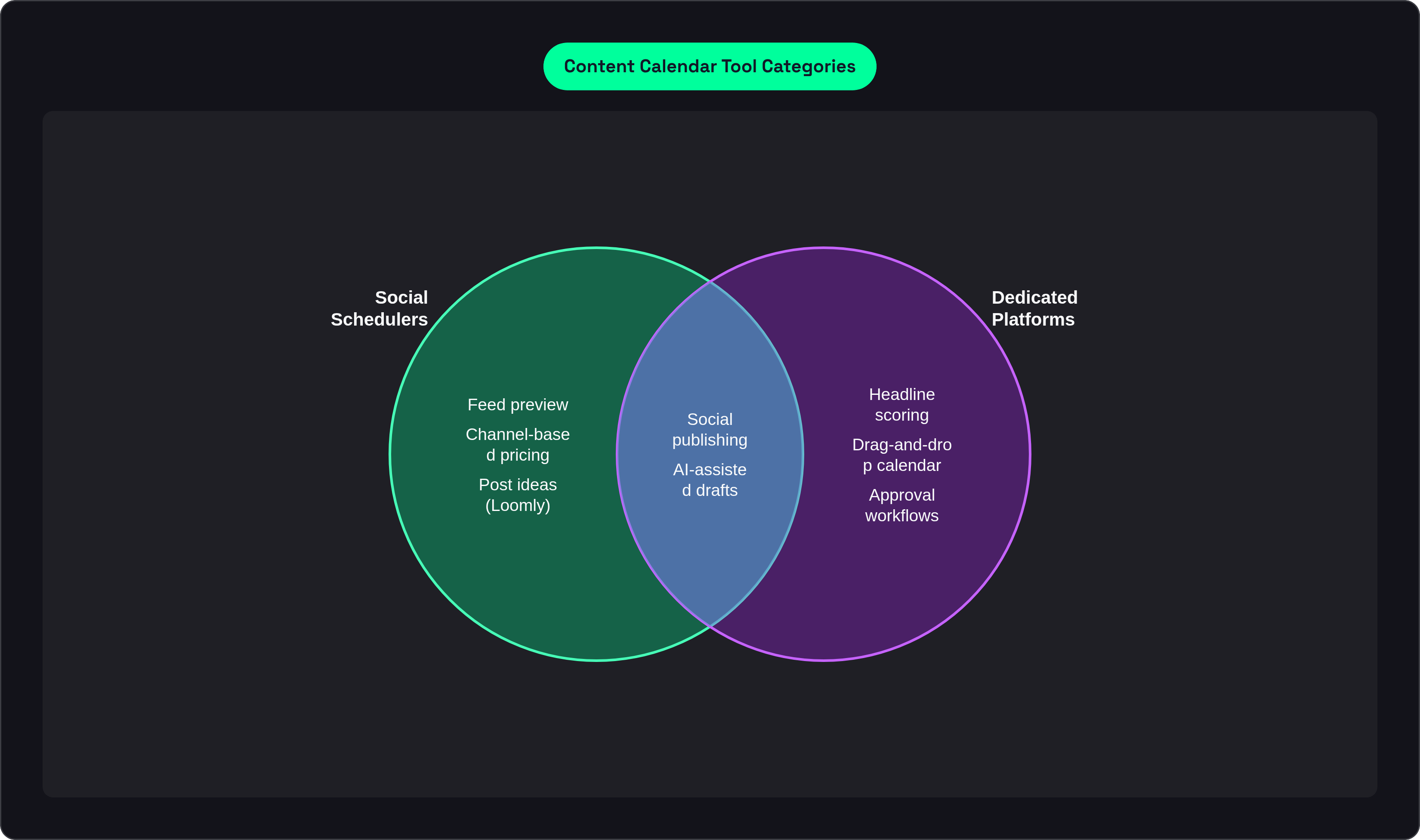
If social media is where most of your publishing happens, and your editorial and email volume stays light, this category earns its keep. Buffer makes the strongest case for solopreneurs and small teams who want clean scheduling without a configuration project attached to it. AI-assisted drafting comes built into its plans across the board. Its pricing scales per channel, which adds up fast for a team juggling a dozen accounts, but team collaboration unlocks at the mid tier without an added per-seat charge stacked on top.
Later takes a more visual approach: drag-and-drop scheduling with a feed preview, which suits image-heavy channels like Instagram particularly well. It covers a wide channel list, Instagram, LinkedIn, TikTok, Pinterest among others, and tends to come out more cost-efficient than Buffer once a small team is managing several accounts at once.
Loomly adds something the first two don't: approval workflows and built-in post ideas, a real step toward content operations rather than pure scheduling. Worth flagging, though: Bending Spoons acquired Loomly in early 2025, and that company has a track record of raising prices on the apps it buys. Loomly's 2025 repricing already made it a tougher sell for solo users and small teams. Still worth evaluating, just go in knowing the price you see today may not be the price you see next year.
Here's the ceiling on this whole category, and it's a hard one: social schedulers schedule social posts. They don't connect to your blog calendar, your email sends, or your video production pipeline. The moment your content mix expands past social, you're going to need a different kind of tool, or a second one bolted on next to it.
Project management tools adapted for content planning
Teams often land here for a simple reason: they already run other work through Asana, ClickUp, Notion, or monday.com, and content planning slots into a tool people already have open all day.
Asana offers calendar, board, list, and timeline views without demanding a complicated setup process. Its multi-homing feature is genuinely useful for content specifically: one blog post can live inside both the editorial calendar and a product launch project at the same time, without duplicating the task. It fits best for teams with straightforward workflows that don't need social publishing built into the same tool, and it shows up consistently well-rated across marketing calendar software reviews on G2.
ClickUp goes further toward an all-in-one workspace: planning, task execution, document collaboration, and automation, all under one roof. ClickUp Brain pairs AI with the calendar and task views, generating draft content plans that convert directly into tasks moving through a status workflow. The catch: ClickUp can't schedule or publish to social channels, and it has no native social analytics. It functions as a planning and execution layer, full stop, rather than a publishing tool.
Notion runs on customization: teams build their own calendar out of databases, templates, and linked views, which works well when briefs, research, and brand guidelines all need to live in the same workspace as the calendar itself. The tradeoff is time. Building a Notion setup that actually works takes real hours upfront, and getting content out to social channels means bolting on integrations or separate apps.
monday.com rounds out the category with Gantt, timeline, calendar, and board views, and Gartner recognizes it as a leader in its category. A free tier exists for very small teams, with automation capability scaling up by plan tier from there.
The pattern across all four: none of these were built as content calendar software first. Publishing and social analytics almost always require pairing with something else, which brings back the exact integration problem this whole selection process is trying to avoid.
Dedicated editorial and marketing calendar platforms
This category exists specifically to solve the problem the last one couldn't: blog, email, social, and task work sharing one calendar view, where dragging a due date cascades the change across every connected task instead of leaving you to update four places by hand.
CoSchedule pulls blog, social, email, and tasks into a single shared view. Its Headline Studio feature uses AI to score headlines and suggest improvements before publishing, a real asset for teams where SEO and click-through rate carry weight. The tradeoff is cost: it can run expensive for a small team, and it's less useful once you need cross-functional project management beyond marketing itself. A free calendar tier exists as an entry point, with paid tiers unlocking the rest.
HubSpot Marketing Hub offers a visual drag-and-drop calendar spanning blog, social, email, and landing pages in one place. The appeal for a small team is consolidation, fewer logins, fewer tools to keep track of, but the full Marketing Hub feature set carries a price tag that can be hard to justify at small scale, and its calendar views flex less than what a dedicated project tool offers. This one makes the most sense for teams already inside the HubSpot ecosystem for other reasons.
Planable builds around collaboration as the core product, not a feature bolted on afterward: in-context comments, suggested edits, internal notes, and approval workflows are the whole point. It publishes across a wide range of social channels and fits best where client or stakeholder review is a regular, recurring part of the publishing process. It's a weaker fit for solo or internal-only teams who don't need that review layer.
The honest tradeoff across this whole category: these platforms connect planning to publishing better than anything else on this list, but they tend to price as if every team has a bigger budget than a lean team actually carries.
When a spreadsheet is enough — and when it stops being enough
Google Sheets and Airtable deserve more credit than they usually get. For a very early-stage content operation, or a solo marketer running the whole show, a well-structured spreadsheet functions as a legitimate starting point, not a workaround to feel embarrassed about.
A spreadsheet does a few things fine: it centralizes the publishing schedule somewhere shareable, tracks status, owner, channel, and publish date in columns everyone understands, and costs nothing while requiring zero onboarding. Airtable stretches that model further, adding database logic, multiple views, and automation on top of the flat-sheet format, landing somewhere between a spreadsheet and a lightweight database.
Where it breaks down is predictable. There's no direct social publishing or CMS connection, so the calendar and the act of publishing stay permanently separate. There's no analytics dashboard, so performance data lives somewhere else entirely. Governance falls apart fast once more than two or three people are editing the same file, and manual upkeep gets heavier as volume grows, meaning the system gets more fragile exactly when the team needs it to hold steady.
Here's the signal worth watching for: once the spreadsheet generates more coordination work than it saves, once someone's spending twenty minutes reconciling who edited what, it's stopped being a content calendar. It's turned into a shared document that people manage instead of content.
How AI changes what a small team can realistically produce
AI-powered marketing tools rank as the top B2B budget priority heading into the next planning cycle, ahead of events, owned media, and paid media, according to CMI/MarketingProfs research. That's a real signal about where teams expect to find leverage, not just industry hype cycling through again.
For small teams specifically, the strongest case centers on getting hours back rather than producing something novel. The benefit marketing leaders cite most often from generative AI investment is time recovered, not new kinds of output nobody could make before.
What that looks like inside a calendar tool varies by feature. Draft generation shortens the gap between a brief and a usable first draft, which matters most when the same person planning the content is also the one writing it. Headline scoring, the kind CoSchedule's Headline Studio runs, surfaces engagement potential before a piece goes live rather than after it's too late to fix. Best-time-to-post recommendations take the guesswork out of scheduling decisions that used to rely on gut feel. Bulk scheduling and auto-repurposing let a small team extend its reach without a proportional jump in hours worked. And ClickUp Brain connects the AI output directly to task workflows, so a generated draft plan becomes an assigned task without someone manually copying it over.
None of this replaces having an actual content strategy. What it does is cut the execution drag, the repetitive part of the job that eats the hours a small team never had to spare in the first place. That's a modest promise dressed up in a bigger conversation, but it's a real one; AI won't tell you what to say. But it can absolutely stop you from spending forty minutes formatting a headline that a scoring tool would've flagged as weak in ten seconds.
Worth separating two different things labeled "AI" in this space. A generic generation tool spits out text on demand. A platform that pairs AI-assisted writing with a strategy-first editorial workflow, one built to keep output on-brand and tied to conversion goals rather than just fast, solves a different problem, and it's the one that actually matters for a lean team trying to protect its voice while moving quickly. Adoption of AI features is already widespread across B2B marketing teams, per CMI/MarketingProfs, which means a team not evaluating this in its tool selection is already trailing the field, whether it notices or not.
Matching tool to team: a practical selection framework
Start with the honest version of the team, not the one on the org chart you're hoping to fill out by next year. How many people actually touch content in a given week? Which channels genuinely need managing, just social, or social plus blog, email, and campaign coordination? And right now, today, is the biggest source of friction publishing, planning, or getting sign-off?
The routing from there follows fairly clean lines. A social-heavy mandate with a small account count and a tight budget points toward Buffer or Later. Multi-channel planning layered on top of existing project management habits points toward Asana, ClickUp, or monday.com, usually paired with a separate publishing layer. If collaborative review and approval is the actual bottleneck, Planable solves that specific problem better than anything else mentioned here. A full editorial calendar spanning blog, email, and social in one shared view points toward CoSchedule, or HubSpot if you're already inside that ecosystem for other reasons. Maximum flexibility, for a team willing to spend real setup time upfront, points toward Notion or Airtable. And teams that need AI-assisted writing built into a strategy-first editorial workflow, rather than a scheduler with a generate button stapled on, should look at platforms that pair content production with actual editorial structure rather than treating generation as a bolt-on feature.
A few mismatches show up often enough to name directly. Choosing a tool sized for the team you plan to hire in six months, rather than the team sitting in the room today. Picking on price alone without accounting for the manual work an integration gap quietly creates down the line. And sticking with a spreadsheet well past the point where it stopped saving anyone time and started costing it.
The one non-negotiable, regardless of which tool wins: it has to be where the whole team actually lives. A calendar only works as a coordination system if everyone opens it, consistently, without someone having to remind them. The best tool for a small team carries fewer features per dollar than some competitors and more practical value than most: it lowers the overhead instead of adding to it, measured less by what it can do and more by how much content actually gets out the door per person, per week.
Sources
- https://planable.io/blog/content-calendar-tools/
Sourced the description of Planable's collaboration features including in-context comments, suggested edits, and approval workflows.
- https://asana.com/resources/best-content-calendar-software
Provided the explanation of Asana's multi-homing feature and its usefulness for content teams managing tasks across multiple projects.
- https://coschedule.com/
Sourced information about CoSchedule's Headline Studio AI feature for scoring and improving headlines before publishing.
- https://postfa.st/blog/buffer-vs-loomly-vs-postfast-2025-pricing-and-features
Provided details on Loomly's 2025 repricing following the Bending Spoons acquisition and its impact on small teams.
- https://bevisible.app/software/compare/loomly-vs-buffer
Informed the comparison of Buffer's pricing model, specifically that team collaboration unlocks at mid tier without an additional per-seat charge.