Repurposing Webinar Content Into a Full Content Campaign
One webinar becomes multiple assets when you extract and map its content strategically.
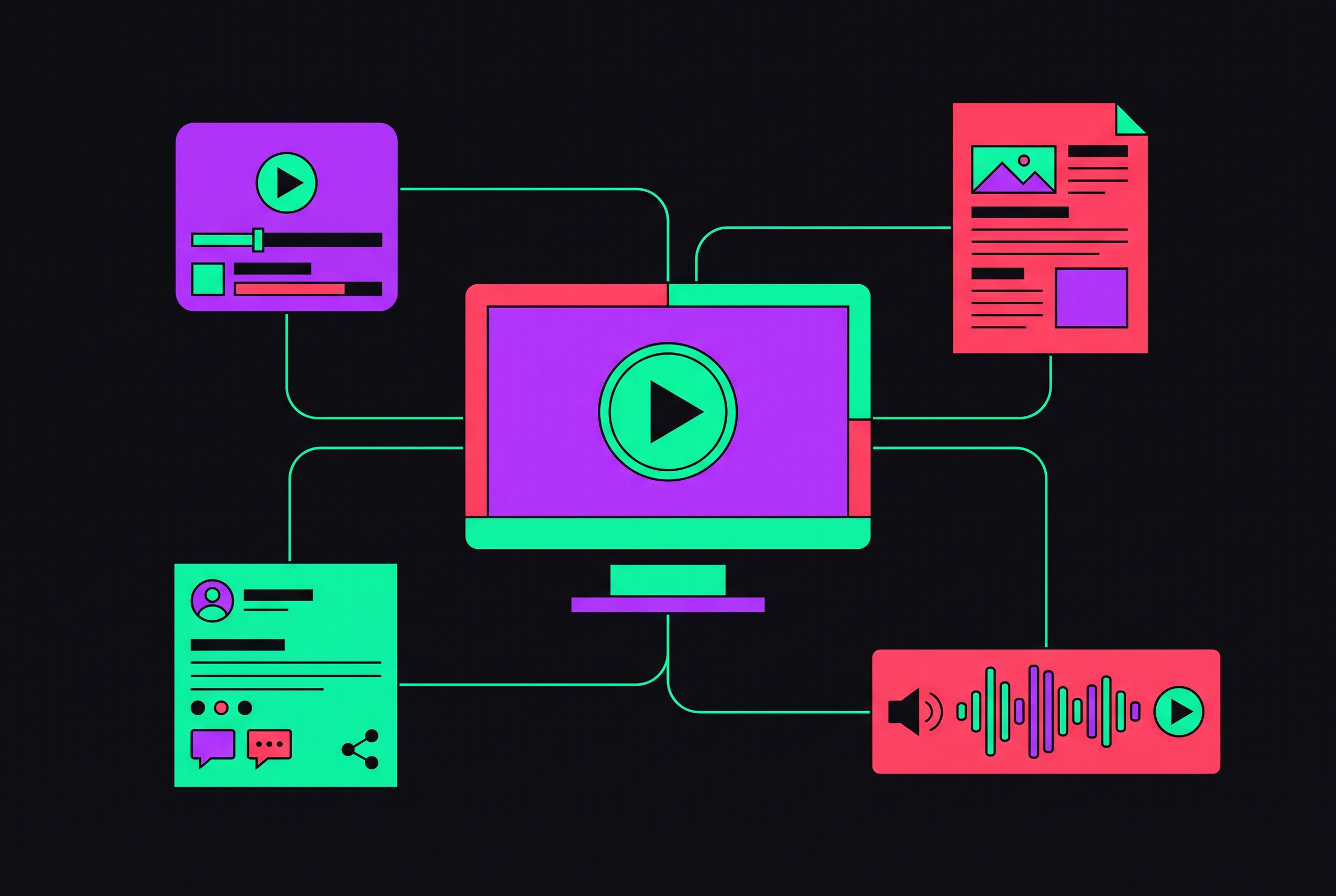
One webinar produces way more material than the time spent hosting it. Make recording raw material for the whole push, not something you leave on a page and ignore. Most groups do the opposite: they pay for booking a speaker, making slides, and pushing that registration page around, but once the live part wraps, out goes an email carrying a replay and everything stops.
Stopping there feels off, because replay viewers are too big to brush aside. ON24's Engagement Intelligence Report shows on-demand replay watching hit 48% of all webinar traffic, climbing past 44% twelve months earlier. The people viewing replay are almost the size of those watching live, yet many repurposing strategies, if there are any, leave it out.
Split the recording into its real pieces and what you can reuse adds up fast. It has that structured argument (main point, proof, ending) built like a long-form piece, only said aloud rather than typed. You hear a pro talking: exact phrasing you can lift as highlights, plus any citable assertion that AI will surface. You get audience signal: poll results, the live Q&A alongside chat questions, all telling you exactly what still confuses your audience and how they phrase it. The visual layer holds slides full of frameworks plus data you can turn into one infographic. Plus every standalone stat the speaker cited works as its own piece of credibility.
The Q&A gets thrown away more than anything else here. Audience asks count, functionally, as the FAQ plus keyword research many groups buy from outside shops, and it’s already there in the transcript, unused.
Using 19,000+ webinars from 418 companies, Goldcast's 2025 Webinar Benchmark Report found repurposed output jumped over 11,000%. This gap is too big for rounding error. The groups pulling this off quit seeing a webinar like some event, choosing instead to treat it as files stored on a disk. No fresh content needs creating. That material exists already. The only question is if someone returns and breaks it down.
The extraction step that most repurposing guides skip
Someone says "let's cut some clips," opens the recording with no plan for what's actually in it, and starts editing without a map. That pattern beats resourcing issues at explaining why the repurposing output stays low even in teams that truly aim to do more. Throughout the whole workflow, the biggest mistake is Skipping that segmentation pass, and you can correct it fast.
Do one segmentation pass ahead of any making, not while it happens. A content lead holding that transcript plays the recording back, timestamps each part using a checklist. Grab the strongest few quotable moments, those precise spots where a speaker's point sharpens and becomes a take of their own, not a recap of their remarks. Mark each data point cited during slides or said aloud, since those statistic-heavy passages win citation within AI-generated answers. Research into generative engine optimization found that content using verifiable, sourced figures sees 30 to 40% more visibility compared to pieces lacking them. Capture each audience query word-for-word, as these map cleanly to FAQ schema down the line. Flag those visual moments in which a diagram showed up. Whenever the argument takes a new turn, that part can become a standalone item.
This calls for as much record-keeping as it does creative effort, and most groups are already short on documentation. That timestamped extraction map made once the event ends shows one simple part of that practice. Repurposing stops drifting toward whichever clip a person might want to cut that day.
What you get here is a map rather than text: timestamp, quote or data point, plus the layout. No output yet.
The bottleneck was once Transcription, but that has changed. Automated transcription software has dramatically reduced the work here, removing the final reason for skipping this.
Mapping extracted content units to formats and funnel stages
Pick your content type based on the reader's funnel stage, not on whichever asset ships fastest. Most groups start publishing once an extraction map exists, yet this instinct misfires: one clip made for attention won't help a buyer deep in talks, while a gated eBook can't help a person new to the company.
Up-funnel, it's all about getting seen. Brief clips running 15 to 60 secs, pulled from the sharpest bits or highly visual moments, play well across LinkedIn, YouTube Shorts, Reels, plus TikTok. Quote cards pulled from a speaker's boldest assertions handle that work without moving pictures. A poll result or a striking stat can stand alone as a teaser.
Once prospects reach the funnel's center, you need to teach them and prove your expertise. A transcript is restructured from raw text into a long-form blog post, which can perform well for AI citation and search ranking. The main framework from your slides turns into one branded infographic. The lightly trimmed recording works as a podcast episode. Each email nurture sequence uses a single takeaway in every email, with each one linking to the entire recording.
Conversion is the aim at the funnel's lowest stage. You can turn that transcript into a gated download, or use its distilled form as a checklist or brief eBook: a lead magnet crafted from material which already exists. An on-demand registration page makes a recording a lasting funnel entry point, not a broken URL. Short clips showing a speaker's credibility, or any audience testimonial, work as remarketing creative.
Attendees plus non-attendees need different nurture sequence paths, while treating both alike stays a mistake. Anyone who stuck around for the entire thing already gets the main point. A registrant who skipped it requires a wholly distinct on-ramp. Segmenting on whether people showed up means every sequence can build on what they already learned, not repeating it.
According to Semrush's data on content, 72% of all marketers systematically break a webinar into 3 or more derivative formats, rising from 65% twelve months earlier. Once, hitting that many formats felt ambitious. These days that counts as a baseline, and such teams shipping a lone blog recap for each webinar trail a standard already well beyond them.
How repurposed webinar content feeds AI visibility, not just SEO
People's searching habits have changed, and done so quickly that calling it a tomorrow problem already counts as an error. By mid-2026, Gartner predicted in 2024 that traditional search engine volume would drop by 25% by 2026. Referral traffic from AI chatbots has grown rapidly, with companies that fail to appear in AI-generated answers losing access to a fast-expanding source of visibility. Standard ranking efforts alone won’t bridge this gap.
Webinar repurposing ties in right away, since what well-extracted webinars produce matches the signs AI tools rely on when picking whom to cite. Verifiable figures linked to a known source are a proven move for engine-driven generative optimization. A speaker’s words offer AI one citable claim to use, not any vague paraphrase. Reformatted Q&A content using FAQ schema gives a clear answer-engine optimization signal, structured for any chatbot to use cleanly. One pillar article with cluster content from that same webinar builds topical weight, so AI sees the company as a real expert, not any page that rose briefly.
Generative engine optimization relies heavily on planning, including positioning, ecosystem reach, and lasting trust. Repurposing a Webinar with care is among the faster routes to that 80% side, as the material at hand, specialist insight, actual data, an argument that's structured, exists already before any blog post does.
That shifts how teams should make derivative content. Add real citations to your blog post instead of making statements. On the FAQ page, genuine schema markup beats a bulleted rundown posing as FAQs. For passage-level relevance, a pillar article can hold strong topical weight. The visibility stays measurable here: Some tools track whether repurposed content gets cited by AI-generated answers or named on AI channels, since skipping that visibility step makes repurposing a shot in the dark.
The production workflow that makes this system repeatable
Ambition isn't what leaves most teams bottlenecked. The problem is workflow. Repurposing usually gets done on the fly, when somebody finally thinks of it, which explains Goldcast's 2025 data showed webinar volume climbing 225%, with significant gains in derivative assets. Volume with no workflow produces extra unrepurposed recordings left in one folder.
AI tooling dramatically cut how long this takes. According to Semrush's content data, AI-assisted clip extraction cuts webinar repurposing down to 47 minutes, versus 6.2 hours before. This gap is what makes the difference between work you skip when time runs out and something done before the day ends.
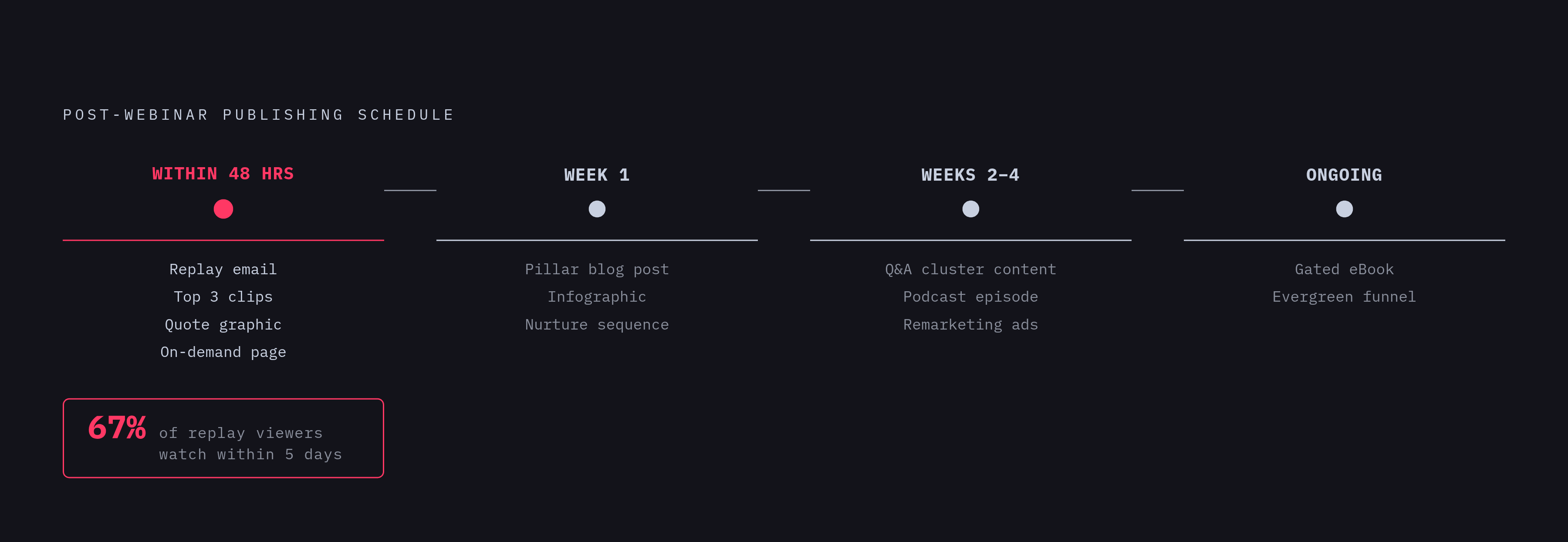
This repeatable workflow kicks off ahead of the webinar. You pick the formats, assign owners, and set publishing dates before you start, not later. It’s been noted that planning repurposing up front works better than retrofitting after a recording exists. Within 48 hours of the live event, the team sends the replay announcement email, cuts the top three clips, posts one quote graphic, and gets the on-demand page live. During week one, the transcript becomes the pillar blog post, the infographic is released, and the nurture sequence launches. Weeks two through four cover cluster content built from the Q&A questions, the podcast episode, and remarketing ad creative. Then eBook stays gated, serving as an ongoing lead magnet, while that on-demand page remains the evergreen entry point for a funnel.
When you publish counts more than you'd think. Among replay viewers, 67% tune in during the 5-day window after a live event. Push your top-of-funnel assets out early in that stretch, or the people in your audience ready to join slip past you.
When agencies do this for several clients, each workflow calls for clear account boundaries, plus briefs that are templated, with planned scheduling not tied to someone remembering to post. For a single brand, doing it by hand works well. But managing a whole portfolio that way fails, and if you act like it won't, repurposing just stops by the time you reach client number three or four.
How agencies run this system across a client portfolio without it collapsing
Using the workflow with one client is manageable. Doing this for twelve clients simultaneously introduces a whole new mess, since weak spots multiply rather than just stack.
Account hopping without proper data isolation is the initial issue. Prompts plus assets and results must be kept separate per client, otherwise account managers start second-guessing which data is theirs. Next, no rollup view means a manager of an account can't spot at a glance whose webinar material is lifting AI citation or search results, and winds up assembling that breakdown alone, brand by brand, each billing cycle. Number three is inconsistency across instructions, so output reflects whichever account manager handles that account instead of the actual content. Billing friction comes last: when a tool is priced by user or by label, a firm has to cover the hit or bill clients unevenly, and both choices erode profit as quarters pass.
Even a few webinars for each client, when multiplied over a whole book of business, turns into many repurposing projects happening at once annually. The argument for offering this as client support is solid, yet this holds only when the setup behind it can handle the volume, the point where many agencies stall.
Some platforms target this layer: one workspace spanning your whole portfolio, cumulative analytics tracking AI visibility inside every client account without any manual rollup, plus granular per-client keys, and billing structured around how shops work, not a per-brand flat setup.
Tooling by itself won't bridge that gap, however. If Account managers fail to explain AI visibility using plain terms, they won't close deals or hold clients, which points to coaching needs as much as software ones. To prove repurposing is worth it, account staff use regular client updates plus data pulled per-client that track real citation shifts instead of just counting assets.
Measuring whether the repurposing campaign is actually working
Much measurement of webinar repurposing stops with simple counts: plays, downloads, visits. Those show that content got around. Those numbers don't show real impact, and using them as ROI evidence is the most frequent measurement mistake across the whole workflow.
For sales, the metric to watch is replay-to-opportunity conversion. ON24 data shows replay-sourced prospects turn into deals just 9% less often than live-attendee-sourced ones, proving that replay audience drives actual revenue instead of being a nice engagement afterthought. Search visits for each pillar article plus related cluster content shows if webinar-derived pages are gaining ranking strength.
AI citation tracking adds a layer most analytics miss completely. Do AI-generated answers name your company when buyers ask about the webinar's subject? A company can appear on Google's first page yet be absent in the answer some AI chatbot gives each buyer, while the gap can lose sales. Lead magnet conversion shows if that gated download pulls in fresh prospects or simply recapturing those already listed. Email results should be tracked by group: attendees, non-attendees, and replay viewers, since every group's curve of engagement looks different, while averaging all together hides exactly that signal needed.
Buyer actions already reflect AI citation, so it's no concern for the future. G2's Answer Economy 2026 report found 51% of B2B software buyers now start their research in an AI chatbot more often than in Google, up from 29% in April 2025, and 69% ended up choosing a different vendor than they'd originally planned because of what an AI chatbot told them. When AI answers skip over you, the harm goes well beyond being hidden. That rival wins sales from a buyer who wouldn't have looked their way before.
Agencies need to show clients this link clearly. When you're handing your client any report showing fourteen derivative assets, it barely matters if customers never hear the company named by a chatbot discussing that field. The measurement cadence needs to match publishing plans: every week during the early post-webinar period, as replay views and indexing both rise most, then each month later for the wider path of search ranking plus AI citation gains.
Sources
- How To Build Your Content Strategy for 2026
Provided the ON24 replay traffic figures (48%, 44%), Goldcast benchmark data, Semrush format statistics, replay viewer timing (67% in 5 days), replay-to-opportunity conversion gap (9%), and G2 Answer Economy 2026 buyer behavior figures cited throughout the article.
- https://www.gartner.com/en/webinar/775391/1757027-integrate-aeo-and-seo-improve-online-search-and-answer-engine-visibility
Sourced the Gartner 2024 prediction that traditional search engine volume would drop 25% by 2026, cited in the AI visibility section.