Website Content Plan Template for New Sites
Plan your site's structure before writing content to avoid disconnected pages and wasted resources.

A website content plan template gives a new site its scaffolding before anyone writes a page: goals, audience, page inventory, ownership, and governance, decided in that order, so the site works as a growth tool rather than a static brochure⟦c1⟧. The plan itself stays invisible to visitors. Nobody browsing a homepage sees the spreadsheet behind it, because the plan produces the structure visitors experience without ever being visible itself. But it is load-bearing in the way foundations are load-bearing: nobody admires them either, until the structure above them cracks.
Sites built page by page, without that scaffolding, tend to become collections of disconnected content. There's no clear hierarchy connecting a service page to a blog post to a contact form, no growth mechanism driving one piece of content into the next, and no way to measure if any of it is working. Each page gets written to solve whatever problem felt urgent that week.
Ownership compounds the problem. Without clear owners and an approval process established early, even a well-written site degrades over time through piecemeal updates, one team's messaging drifting from another's, pricing pages going stale while the blog moves on to new topics. Nobody planned for that outcome. Nobody had to. The absence of a plan is a decision in itself, just one made by default.
And the environment a new site launches into has gotten considerably noisier. Estimates put AI-assisted web page publication at around 312 million pages a month in 2026, up from roughly 82 million in 2024⟦c2⟧. The planning bar rises accordingly, because the noise floor that any new site has to cut through has risen with it.
Getting the allocation decision wrong mid-quarter raises the cost beyond wasted hours, into wasted momentum. A content plan template exists to answer that question before the writing starts, not while it's underway. Get the allocation decision wrong mid-quarter and the cost isn't just wasted hours, it's wasted hours nobody notices were wasted until the next review cycle.
What follows here works through goals, audience, competitive positioning, the sitemap, content pillars, format and channel choices, the calendar, and the governance that keeps all of it from decaying, in the order it actually needs to happen. 66.5% of content marketers struggle with knowing where to allocate resources, per Siege Media as cited by The Digital Elevator, and the template's job is to make that allocation decision before content work starts, not during it ⟦c3⟧.
The parts of a website content plan template and how they connect
Strip away the branding around any given framework, and evaluating competitors means looking beyond UI to sitemap structure, SEO signals, content strategy, messaging, and key landing pages ⟦c13⟧.
New site teams generally need three distinct templates, not one⟦c4⟧. A content planning template operates at the site level: which pages exist, what each one covers, how they relate to each other. A content outline template works at the page level, and it's more granular than most teams expect going in, covering headline, URL, title tag, meta description, primary keyword, content type, secondary keywords, calls to action, and image and video requirements⟦c5⟧. A content audit template does the evaluation work, useful before launch to assess any draft content already sitting around, and useful again after launch to keep the page inventory current as the site grows.
Across the frameworks that practitioners actually use, eight components keep appearing in practice: audience clarity, business goals, content channels, posting frequency, content pillars, seasonality, categories and formats, and workflow⟦c6⟧. These eight components don't function as independent checkboxes to fill in isolation ⟦c6⟧. Goals inform who the personas are and what they need. Personas shape which pages belong in the sitemap. The sitemap determines which topics deserve pillar treatment. Pillar selection sets the calendar. And none of the calendar holds up without governance behind it to keep it moving.
That's the actual argument for using a template at all, rather than a folder of loose documents. Without one connective structure, each of those decisions gets made separately, by whoever happens to be working on that section that week, and the site ends up reflecting that fragmentation regardless of anyone's intentions.
Setting goals and KPIs before any content decision is made
"Increase leads" is not a goal. Neither is "improve engagement." These phrases feel like direction but they give a team nothing to act on and no way to check, three months in, whether the site is actually working or just busy ⟦c4⟧.
SMART goals fix that: specific, measurable, attainable, relevant, timely⟦c7⟧. "Increase organic traffic by 150% within 12 months" is a goal a team can plan backward from ⟦c7⟧. "Generate 500 qualified leads through content in Q2" is one a team can staff for⟦c7⟧. The difference isn't stylistic, it's operational: one version tells a writer what to prioritize this week, the other doesn't.
Good goal-setting works on two timelines at once, short-term wins inside the first 90 days and longer growth targets across 12 months, so the team gets early signal without losing the longer arc it's actually building toward⟦c8⟧. A site that only sets 12-month goals has no way to know, in month two, if it's on track or drifting⟦c36⟧.
KPIs need locking in at this same stage, before launch, so reporting stays consistent from day one rather than getting redefined every quarter to match whatever looked good that month: organic traffic, traffic by source, search rankings, dwell time, interactions per visit, conversion rate⟦c7⟧. Change the measurement mid-flight and comparison across time becomes meaningless.
Governance failures in other domains follow the same pattern. IBM's 2025 findings put the share of organizations lacking formal AI governance at 63%⟦c9⟧. That's a different domain, but the root failure is identical: unclear ownership and unclear objectives produce inconsistent outcomes, whether the subject is AI deployment or a content calendar ⟦c9⟧. Clarity up front is the fix in both cases.
The template instruction for this section is a single table: goal, metric, current baseline, target, deadline, owner. One row per goal, no goal without an owner attached to it.
Audience research and personas: the inputs that shape every page that follows
Sit with this number. Companies that exceed their organizational goals document personas at a rate of 71%, against just 37% for companies that miss their goals⟦c10⟧. That's not a small gap, and it implies structural clarity, having written down, specifically, who the content is for before writing the content itself. It's structural clarity, having written down, specifically, who the content is for before writing the content itself.
A persona for content planning purposes is not a demographic sketch, age range and job title and not much else. It needs to explain behavior: why this person visits the site at all, what makes them hesitate before filling out a form, what trust signals they need to see before they'll act, what information they require before a purchase decision feels safe⟦c11⟧. A persona that doesn't answer those questions isn't doing planning work, it's decoration.
Skipping this step doesn't fail loudly. It fails quietly, months into a content calendar, when a team discovers the audience it's been writing for isn't the audience actually showing up on the site. That mismatch is exactly the failure mode documented in guides on website content planning, where teams that skip audience research altogether end up producing content for months before realizing prospects weren't on the same page.
The connection between persona depth and outcomes isn't just about messaging tone, either. Gartner's research found only 14% of customer issues get fully resolved through self-service, largely because content and site structure don't match how people actually search for answers⟦c11⟧. That's a UX and conversion problem wearing a content problem's clothes ⟦c11⟧.
A useful persona captures search behavior and the actual terms someone types into a search bar, content format preferences, the pain points and questions that come before someone even starts looking for a provider, and the objections along with whatever trust signals resolve them.
The template instruction here: one persona card per primary audience segment, and each card ties directly back to content decisions, which pages this persona needs, which formats they'll actually consume, which calls to action will land and which will feel like friction⟦c12⟧.
Competitive analysis and content gap mapping before the sitemap is drawn
Pick two to five direct competitors and look past their homepage design ⟦c13⟧. The useful information sits deeper: sitemap structure, SEO signals like title tags and meta descriptions and image titles (tools like SEOMinion and Ahrefs surface these directly), content strategy, messaging choices, and which landing pages they're clearly investing in⟦c13⟧.
None of this is about copying what's working for someone else. The actual goal is finding where competitors are strong, where they're thin, and where audience needs are going unmet by anyone in the space, because that gap is exactly where a new site has room to establish ground. Imitation gets a new site to parity at best. Gap-finding gets it to a position competitors don't already occupy.
Format gaps deserve as much attention as topic gaps, and they're often easier to act on. If every competitor in a space runs text-only blog posts with no video and no comparison pages, that's not a subtle observation, it's a direct opening. Exploiting a format gap can take less time than trying to out-rank someone on a topic they've already built years of authority around.
The output of this step needs to be concrete: a short, specific list of gaps that feeds directly into pillar selection and the first draft of the sitemap. Not a slide deck that gets presented once and then filed away. The template instruction is a competitor matrix: columns for sitemap structure, top-ranking pages, content formats in use, and apparent gaps, cross-referenced directly against the persona needs identified in the step before it.
Building the sitemap and core page inventory: which pages need to exist
This is the point where planning stops being abstract. By now, goals, personas, competitive gaps, and SEO signals should already answer the question of which pages actually need to exist⟦c14⟧. If they don't, that's a sign one of the earlier steps was skipped or done too loosely.
That's the minimum viable set, deliberately.
The homepage is the main entry point, and it has to communicate quickly who the business is, what it does, and where to go next, because visitors decide within seconds whether to stay. Counterintuitively, it's the page to build last, once every other core page exists in draft form, because the homepage's job is to summarize a site that needs to already be there to summarize.
The Products or Services page is the commercial core (its exact structure varies by business, but some version of it must exist for every site⟦c16⟧). A Blog or Insights section answers the questions people have before they buy, which matters most for service businesses, where people often go looking for advice well before they go looking for a specific provider⟦c17⟧. The Contact page might be the single most important page to keep current: stale contact information doesn't just lose a sale, it actively hurts visibility in both traditional search and the AI systems increasingly parsing a site for trust signals⟦c18⟧. And legal pages, Privacy Policy and Terms of Service, aren't optional extras, they're compliance requirements that AI systems are scrutinizing more closely as a trust marker in their own right⟦c19⟧.
The template instruction: a page inventory table, page name, URL slug, primary persona, primary keyword, page goal, content owner, target publish date⟦c20⟧. The homepage-last sequencing deserves its own explicit line in that table, because it's the rule most likely to get skipped by a team eager to get the front door finished first. Most small business websites perform well with 5–10 core pages, then expand strategically as the business grows, per networksolutions.com, the minimum viable page set ⟦c15⟧.
Content pillars and topic clusters: the architecture that builds authority over time
The pillar-and-cluster model organizes content around one comprehensive hub page per topic, with cluster articles covering adjacent subtopics and linking back to that hub⟦c21⟧. The effect is to concentrate topical authority in one place instead of scattering it across dozens of loosely related posts, and it gives AI systems a clean entity graph to cite from when answering a query related to that topic⟦c21⟧.
That length isn't padding, it's coverage: a pillar page is supposed to be the page a reader doesn't need to leave to understand the topic at a basic level.
Keyword-to-content mapping keeps this from collapsing into duplicate coverage.
For a new site specifically, the sequencing matters. Publishing a dozen cluster articles before the pillar page itself is solid gets the order backward ⟦c36⟧. The pillar is the foundation the clusters are meant to support, and clusters built around a weak or thin pillar don't have much to link back to.
This is also where the earlier competitive gap analysis earns its keep. Pillar topics should be chosen partly for where the gap is widest, because search volume alone doesn't tell a new site where it can actually win ground. Pillar page specs call for 3,000–6,000 words, definitive in scope, refreshed quarterly, and linked from primary navigation, per digitalapplied.com ⟦c22⟧. The template instructs building a pillar map with one row per pillar topic, covering pillar page title, target keyword, cluster article titles (3–5 per pillar to start), assigned keywords, internal linking plan, and refresh cadence ⟦c23⟧.
Content formats and channel mix: matching how the audience consumes information
Different people absorb information differently, and mixing formats, blog posts, how-to guides, infographics, keeps a wider range of that audience actually engaged rather than losing the portion that doesn't respond well to plain text.
Blog articles paired with a matching video generate 70% more traffic on average than articles published without one⟦c24⟧. That's a large enough gap to justify building video into the plan from the outset, as a default line item in the format matrix, rather than treating it as a retrofit once the blog is already running.
Channel choice matters just as much as format choice. Research from January 2026 puts a website and an email list at the top of the durable-channel hierarchy: algorithms shift, platforms shut down or change their terms, but owned channels persist regardless⟦c25⟧. Email carries the highest ROI for conversions specifically, while blog content does the heavier lifting for SEO and thought leadership⟦c25⟧. Sequencing matters again for a new site: build out the owned channels, the website and the list, before pouring resources into social platforms whose reach and rules a business doesn't control.
Visual elements, video, infographics, charts, interactive pieces, aren't decoration bolted onto finished copy. They break up dense text, clarify ideas that are hard to explain in sentences alone, and hold attention longer, which means their production needs to be in the plan alongside the writing, not tacked on after a draft is already done.
The template instruction: a format matrix, content type, primary channel, production owner, estimated production time, and a repurposing path, a blog post that becomes a video script that becomes an email summary, so one piece of work generates three assets instead of one ⟦c4⟧.
Editorial calendar and publishing cadence: turning the plan into a durable schedule
A weekly template gives the calendar its skeleton. Something like Mondays for new blog posts, Wednesdays for the newsletter, Fridays for social engagement, gives a team a rhythm they can plan around rather than reinventing the schedule every week from scratch⟦c26⟧.
New sites do better starting narrow: a 90-day asset calendar, three high-impact channels chosen deliberately, weekly explainer videos on a fixed cadence, and one simple measurement plan locked in before the quarter starts⟦c27⟧. Ninety days is enough time to learn what's actually working, and short enough that a wrong bet doesn't cost the rest of the year ⟦c27⟧.
Quarterly review needs to be a fixed line item, not an afterthought squeezed in whenever someone remembers. Reviewing and updating site content at least once a quarter measurably improves SEO performance and user experience, and it's the mechanism that keeps information from quietly going stale⟦c28⟧.
The homepage-last principle threads back through here too. The calendar should sequence the core pages to completion before the homepage gets finalized, so the homepage ends up describing a site that actually exists rather than one the team hopes to build.
The template instruction: a 90-day calendar grid, week, content piece, format, channel, production owner, review owner, publish date, status, with a recurring quarterly review slot built into the grid from day one rather than added later⟦c29⟧.
None of this works if resourcing stays vague. Roughly 39% of content marketers name resource constraints, time, people, budget, as their top challenge⟦c30⟧. A calendar's real job is making those limits visible on paper before the quarter starts, so a team is planning around a known constraint instead of discovering it mid-sprint when a deadline is already at risk.
Content governance: ownership, approval workflow, and quality standards
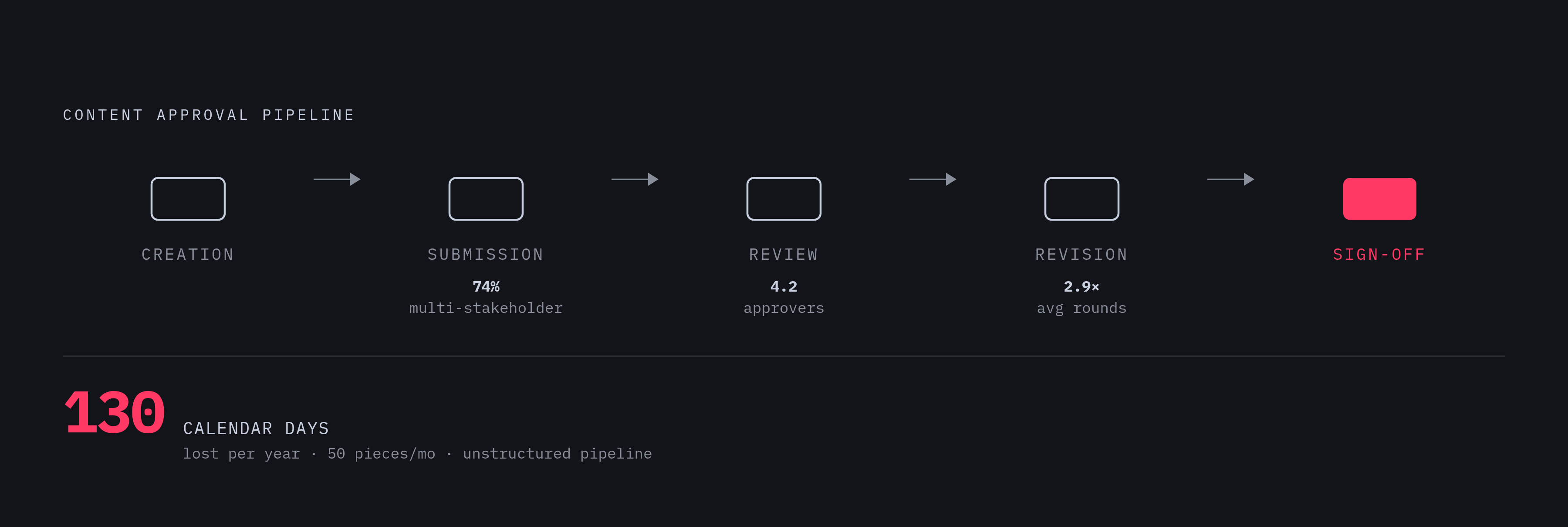
Content governance is the set of people, processes, and standards that decides how content gets created, approved, maintained, and eventually retired. It's the system, in other words, that keeps a site from decaying once the initial launch energy fades.
Approval is more involved than most teams expect going in. On average, 74% of content requires sign-off from multiple stakeholders, the typical approval chain runs through 4.2 people, and a given piece goes through roughly 2.9 rounds of revision before it publishes, numbers a team that hasn't planned for that friction will find anyway, just later and less predictably⟦c31⟧. Those aren't small numbers. A team that hasn't planned for that friction will find it anyway, just later and less predictably.
The cost of leaving that process unstructured is measurable. For a team publishing 50 long-form pieces a month, that gap compounds to roughly 130 calendar-days of earlier publication across a year⟦c32⟧. That's not a minor efficiency gain; it's the difference between a content calendar that holds and one that's perpetually a week behind.
A five-stage workflow turns what usually feels like subjective back-and-forth into something a team can actually track: creation, submission, review, revision, sign-off⟦c33⟧. Each stage is a checkpoint, and each checkpoint is a place where a bottleneck becomes visible instead of invisible.
Governance covers more ground than a style guide alone. It's people (who owns, who reviews, who has final sign-off), process (how a draft moves from creation to publication to eventual retirement), and standards (voice, factual accuracy, formatting, compliance).
The template instruction to close on: a RACI-style ownership table, content type across the rows, and columns marking who's responsible, who's accountable, who gets consulted, and who simply needs to be informed⟦c34⟧. It's the least glamorous document in the whole plan, and it determines if everything built in the sections before it still looks the way it was designed to look a year from now.
Sources
- Effective website content planning: Expert tips for 2026
- Website Planning In 2026: 14 Steps For High-Performing Sites
- 2026 Web Content Template: Get Ready for a Site Relaunch!
- How to master content planning in 10 steps for 2026
- Creating a Successful Content Strategy
- Website content planning: what must be ready | Emote Digital